اختيار Threads التي يستخدمها متجرك

فعّل نقطة البيع وWeave Companion والفروع والتوصيلات أو عطّلها، وتبقى سجلاتك كما هي.

كل Thread جزء من العمل: نقطة البيع، أو Weave Companion، أو الفروع، أو التوصيلات. فعّل ما يستخدمه متجرك فقط، فتبقى القوائم قصيرة ولا يرى فريقك شاشات لا يحتاجها.

1. فتح الصفحة

افتح الإعدادات ← Threads. الصفحة للمالك وحده، ولا يراها غيره.
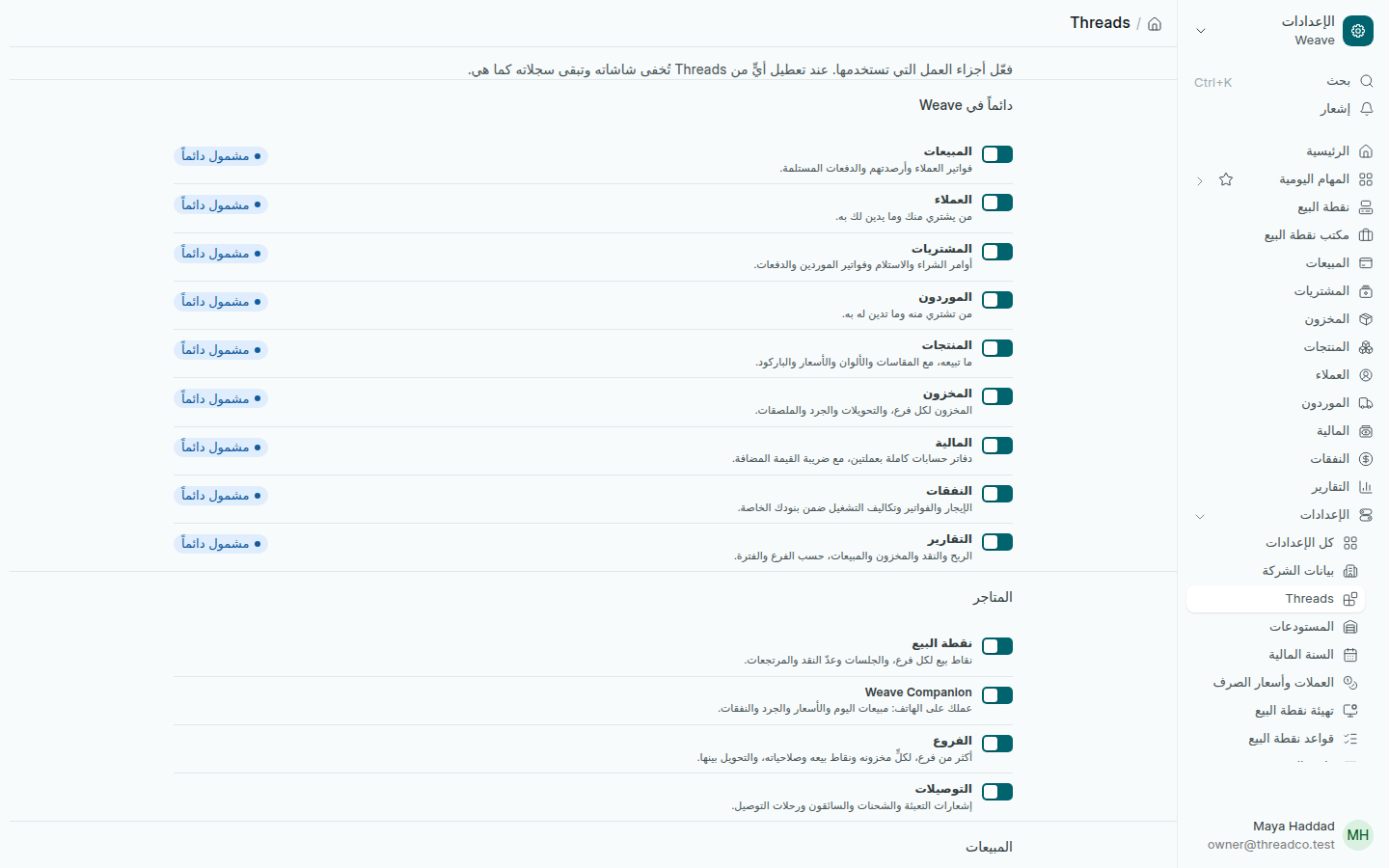
صفحة Threads
كل Thread في مجموعته، ومعه مفتاحه.

2. ما تراه في الصفحة

  • دائماً في Weave: المبيعات والعملاء والمشتريات والموردون والمنتجات والمخزون والمالية والنفقات والتقارير. هذه مشمولة دائماً ولا تُعطَّل.
  • المتاجر: نقطة البيع وWeave Companion والفروع والتوصيلات. هذه ما تفعّله أو تعطّله.
  • المجموعات الأخرى تحمل كلمة قريباً، ولا يمكن اختيارها بعد.

3. تفعيل Thread أو تعطيله

  1. اضغط المفتاح بجانب ما تريد تغييره.
  2. عند التعطيل يُطلب منك التأكيد. اضغط نعم.
  3. أعد تحميل الصفحة لتتحدّث القوائم.

تعطيل Thread يُخفي شاشاته عن الجميع ويمنع فتحها حتى بالرابط. لا يُحذف أي سجل: المبيعات والحركات والقيود تبقى كما هي، وتعود الشاشات حين تفعّله من جديد.

بعض Threads يحتاج غيره. إذا عطّلت واحداً يحتاجه Thread آخر مفعّل، تطلب منك الصفحة تعطيل الآخر أولاً.
Choose the Threads your shop uses

Switch the till, Weave Companion, branches and deliveries on or off. Your records stay.

Each Thread is one part of the business: the till, Weave Companion, branches or deliveries. Switch on only what your shop uses, so the menus stay short and your team sees no screens it does not need.

1. Open the page

Open Settings → Threads. The page is the owner's alone; nobody else sees it.

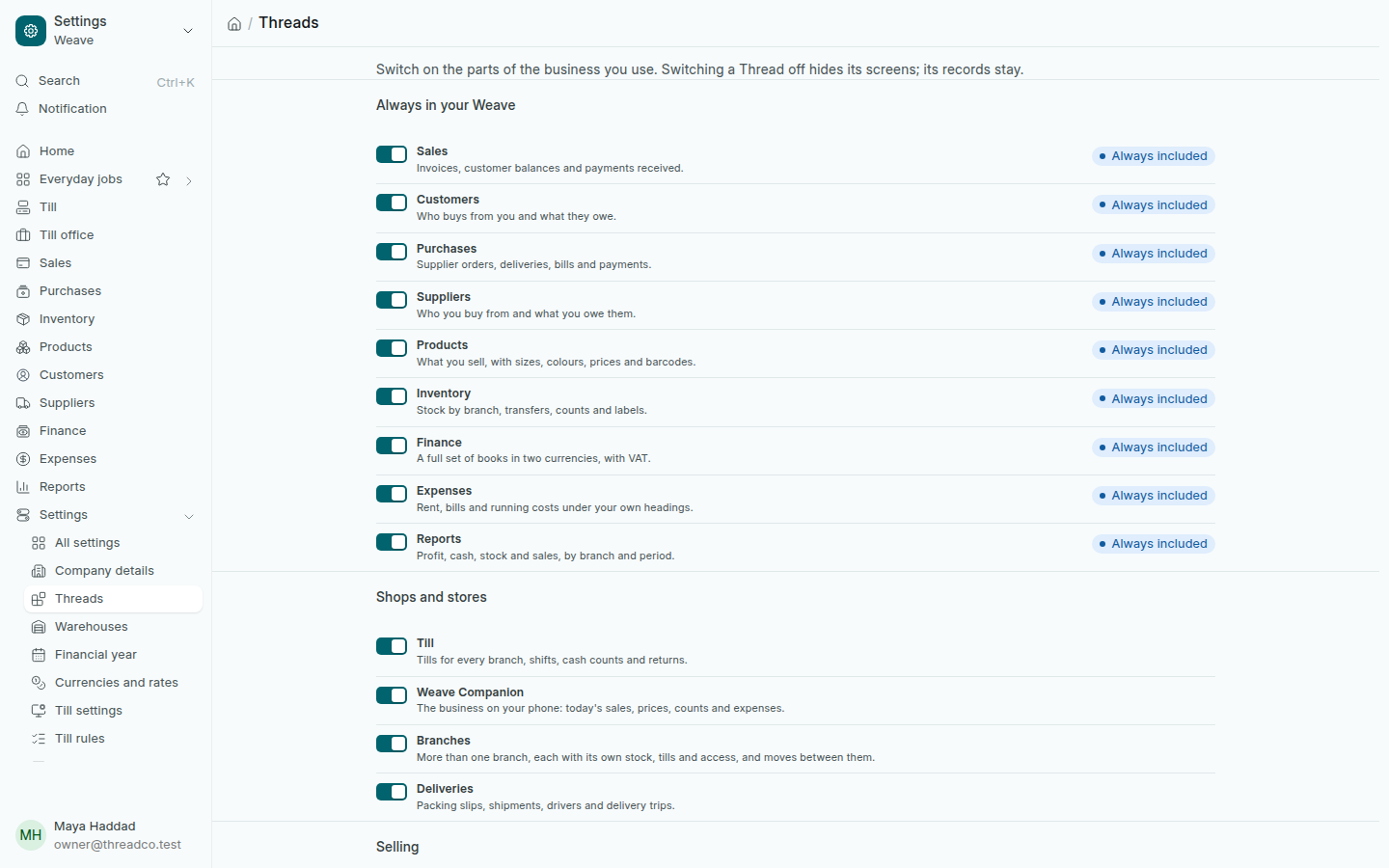
The Threads page
Every Thread in its group, with its switch.

2. What the page shows

  • Always in your Weave: sales, customers, purchases, suppliers, products, inventory, finance, expenses and reports. These are always included and cannot be switched off.
  • Shops and stores: the till, Weave Companion, branches and deliveries. These are the ones you switch.
  • The other groups say Coming soon and cannot be picked yet.

3. Switch a Thread on or off

  1. Press the switch of the Thread you want to change.
  2. Switching off asks you to confirm. Press Yes.
  3. Reload the page so the menus follow.

Switching a Thread off hides its screens from everyone and refuses them even by their link. Nothing is deleted: sales, stock moves and entries stay as they are, and the screens come back when you switch it on again.

Some Threads need another one. If you switch off a Thread that another one still on needs, the page asks you to switch that one off first.