الدفع على الموقع ورسوم التوصيل

الدفع عند الاستلام أو عبر Whish، ورسوم التوصيل التي تُضاف إلى كل طلب.

طرق الدفع

يدفع عملاؤك بطريقتين: عند الاستلام للسائق، أو بتحويل المبلغ إلى رقم Whish الخاص بمتجرك. لا توجد بطاقات دفع على الموقع.

  1. افتح الموقع الإلكتروني ← الدفع على الموقع وانزل إلى طرق الدفع.
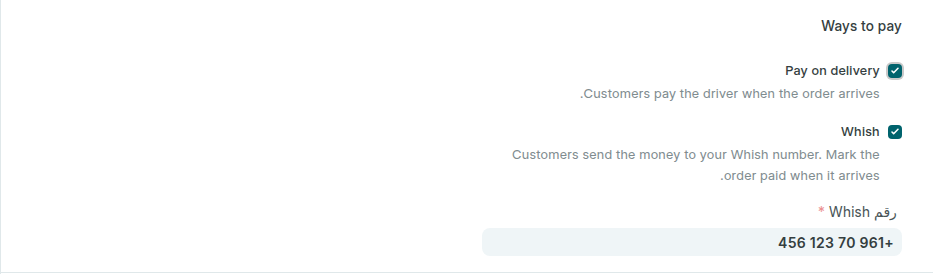
  2. حدّد الدفع عند الاستلام ليدفع العميل للسائق عند وصول الطلب.
  3. حدّد Whish واكتب رقم Whish لمتجرك بالصيغة الدولية، مثل +961 70 123 456.
  4. اضغط حفظ.
طرق الدفع على الموقع
الدفع عند الاستلام وWhish، مع رقم Whish للمتجر.

بعد الطلب يرى العميل في صفحة طلبه طرق الدفع التي فعّلتها، ومع Whish المبلغ ورقمك ورقم الطلب ليكتبه مع التحويل. يصل المال إلى حسابك في Whish، وتسجّله أنت كما في الطلبات عبر الإنترنت.

اترك باقي الخيارات في هذه الصفحة كما هي: تضبطها Weave عند إضافة الموقع.

رسوم التوصيل

تحدّد رسوم التوصيل بنفسك: مبلغ ثابت، أو حسب قيمة الطلب، أو بلا رسوم. متجر بلا رسوم توصيل لا يضيف شيئاً إلى الطلب.

  1. افتح الموقع الإلكتروني ← رسوم التوصيل واضغط إضافة.
  2. اكتب اسماً يقرؤه العميل في طلبه، مثل Delivery in Beirut، واجعل نوع قاعدة الشحن المبيعات.
  3. في الحساب حسب اختر ثابت واكتب مبلغ الشحن. أو اختر قيمة الطلب وأضف سطراً لكل شريحة بمبلغها، مثل توصيل مجاني فوق مبلغ معيّن.
  4. في صالحة للبلدان أضف لبنان، ثم اضغط حفظ.
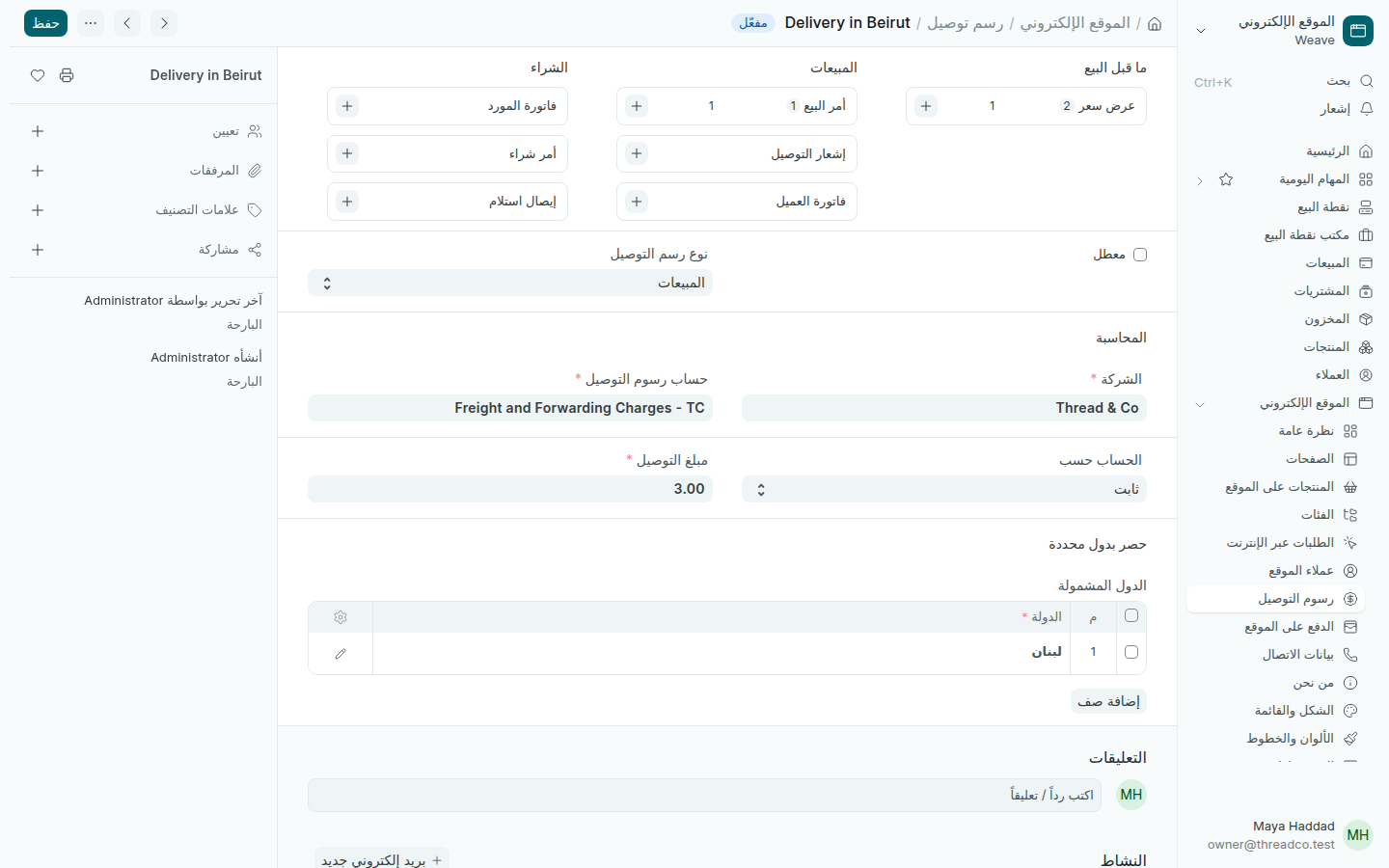
رسوم التوصيل
3 USD لكل طلب في لبنان.

يأخذ الطلب رسوم التوصيل التي يشمل بلدها عنوان التوصيل للعميل. اجعل رسوماً واحدة لكل بلد ليُطبَّق المبلغ الصحيح دائماً.
Payment on the website and delivery charges

Pay on delivery or by Whish, and the delivery charge added to each order.

Ways to pay

Your customers pay in one of two ways: on delivery, to the driver, or by sending the money to your shop's Whish number. There are no card payments on the website.

  1. Open Website → Payment on the website and go down to Ways to pay.
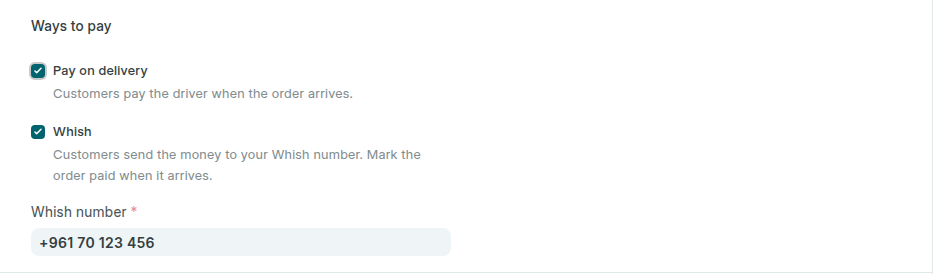
  2. Tick Pay on delivery so customers pay the driver when the order arrives.
  3. Tick Whish and type your shop's Whish number in international form, such as +961 70 123 456.
  4. Press Save.
The ways to pay on the website
Pay on delivery and Whish, with the shop's Whish number.

After ordering, the customer's order page shows the ways you switched on, and for Whish the amount, your number and the order number to write with the transfer. The money reaches your Whish account, and you record it as in Online orders.

Leave the other settings on this page as they are: Weave sets them when it adds the website.

Delivery charges

You set your own delivery charge: a fixed amount, one that depends on the order's value, or none. A shop with no delivery charge adds nothing to the order.

  1. Open Website → Delivery charges and press Add.
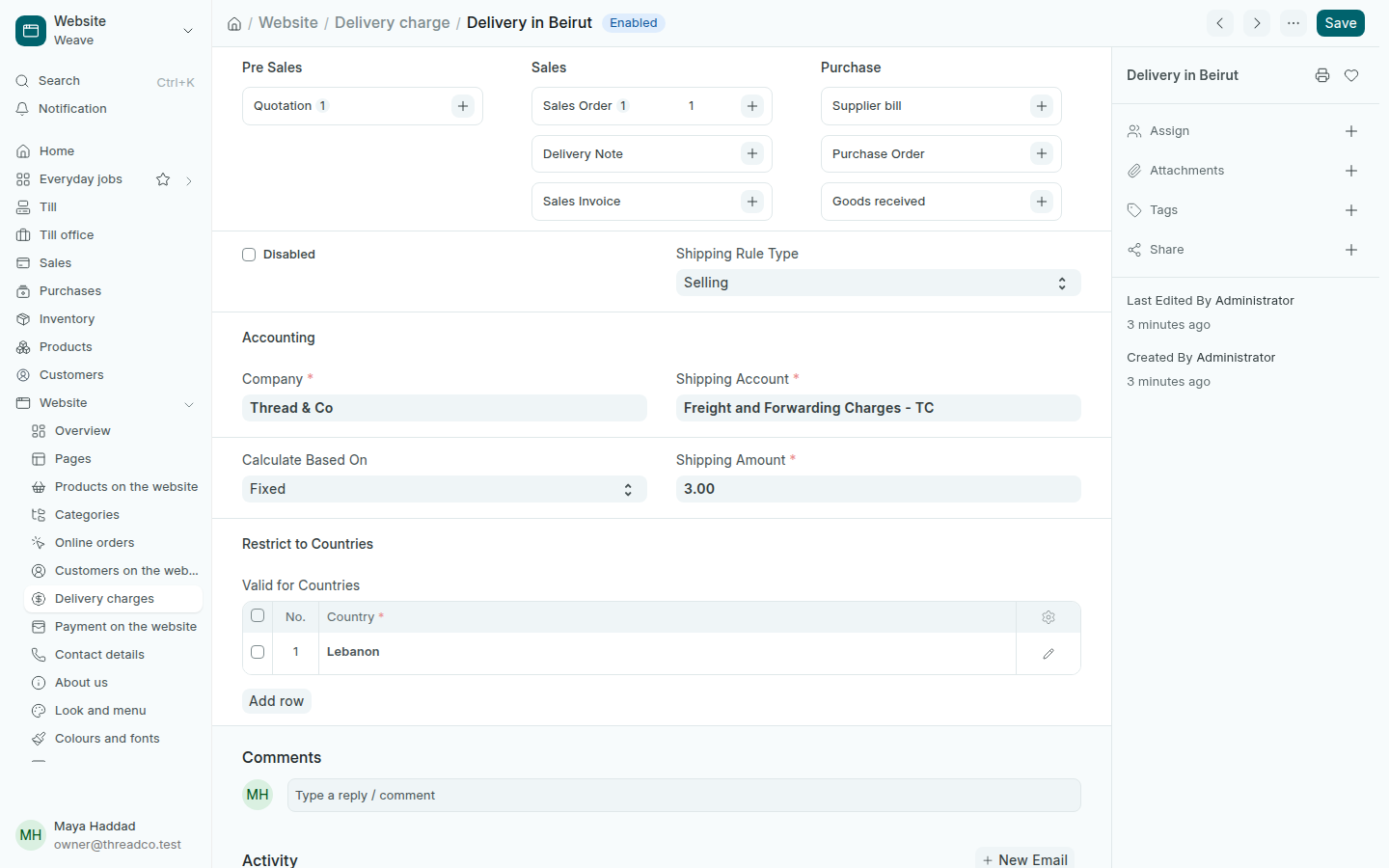
  2. Type a name the customer reads on their order, such as Delivery in Beirut, and set Shipping Rule Type to Selling.
  3. In Calculate Based On, choose Fixed and type the Shipping Amount. Or choose the order's value and add a row per range with its amount, such as free delivery above a set amount.
  4. In Valid for Countries, add Lebanon, then press Save.
A delivery charge
3 USD for each order in Lebanon.

An order takes the delivery charge whose countries include the customer's delivery address. Keep one delivery charge per country so the right amount always applies.