ما يراه عملاؤك وكيف يطلبون

من أول زيارة إلى صفحة الطلب: الحساب والسلة وعنوان التوصيل وطريقة الدفع.

معرفة ما يمرّ به عميلك على الموقع تساعدك على الرد على أسئلته. هذه خطواته:

  1. التصفّح: يرى الصفحة الرئيسية، والمنتجات بأسعارها وصورها، والفئات، وصفحتي التواصل ومن نحن. لا يحتاج حساباً لذلك.
  2. الحساب: ليطلب، يسجّل حساباً باسمه وبريده، فيصله بريد فيه رابط لاختيار كلمة المرور. حساب العميل للموقع فقط: لا يفتح Weave، ولا يرى إلا طلباته وعناوينه.
  3. السلة: يضيف المنتجات إلى السلة ويختار الكمية. لا يمكنه طلب ما ليس في المخزون.
  4. التوصيل: يكتب عنوان التوصيل ورقم هاتفه. تُضاف رسوم التوصيل إن وُجدت.
  5. الطلب: يضغط زر الطلب، فيصبح طلبه أمر بيع في Weave بأسعار متجرك، ويصل إلى فريقك.
  6. الدفع: تعرض له صفحة طلبه كيف يدفع: للسائق عند الاستلام، أو عبر Whish إلى رقمك مع رقم الطلب.
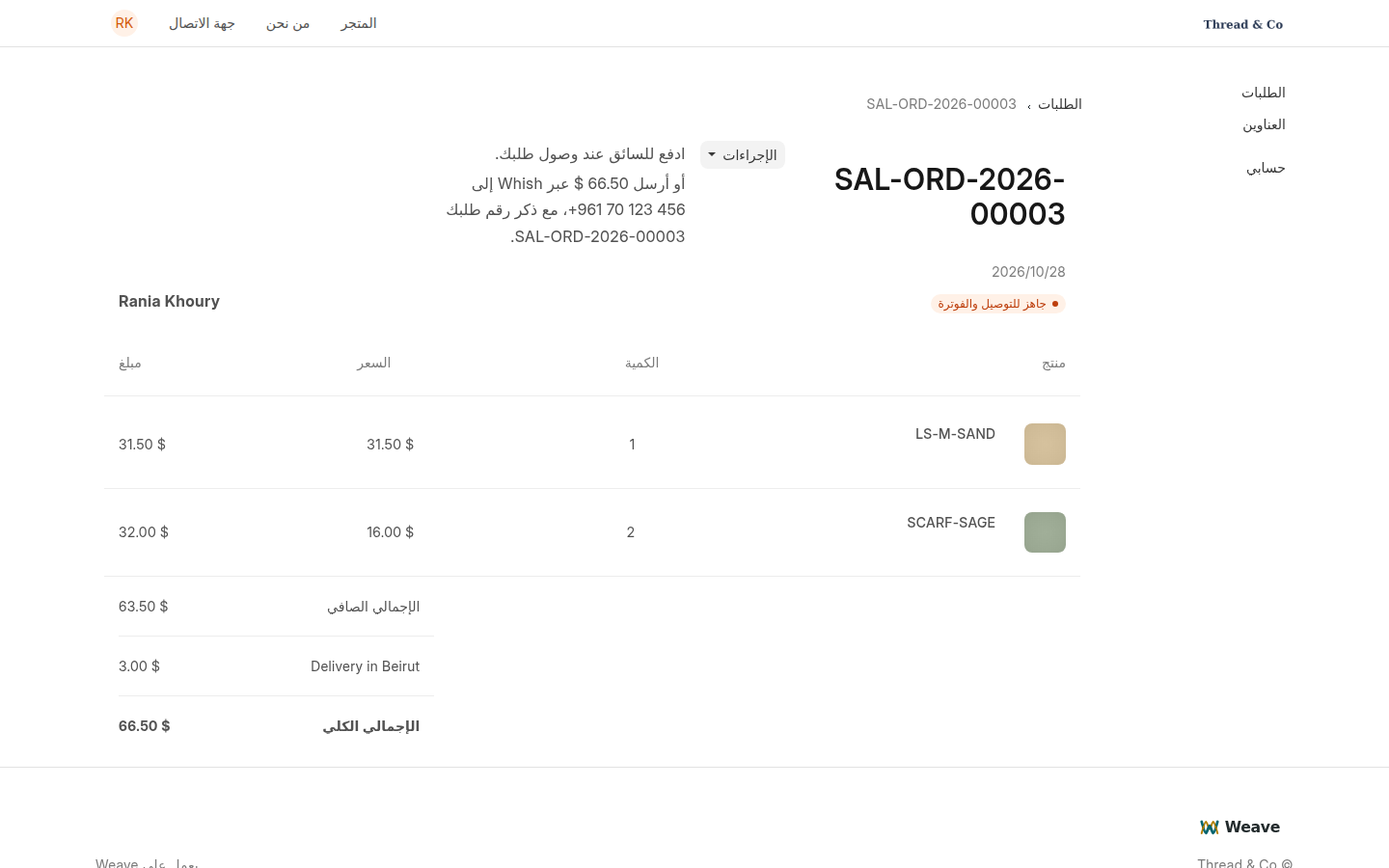
صفحة طلب العميل على الموقع
صفحة الطلب كما يراها العميل: المنتجات والتوصيل والإجمالي وطريقة الدفع.

يجد العميل كل طلباته وحالتها في حسابه على الموقع، تحت الطلبات.
What your customers see and how they order

From the first visit to the order page: the account, the cart, the delivery address and how to pay.

Knowing what your customer goes through on the website helps you answer their questions. These are their steps:

  1. Browsing: they see the home page, the products with their prices and pictures, the categories, and the contact and about pages. No account is needed for this.
  2. The account: to order, they sign up with their name and email and receive an email with a link to choose a password. A customer's account is for the website only: it never opens Weave, and it shows only their own orders and addresses.
  3. The cart: they add products to the cart and choose the quantity. They cannot order what is out of stock.
  4. Delivery: they type the delivery address and their phone number. Your delivery charge, if you set one, is added.
  5. The order: they press the order button, and the order becomes a sales order in Weave at your shop's prices, which reaches your team.
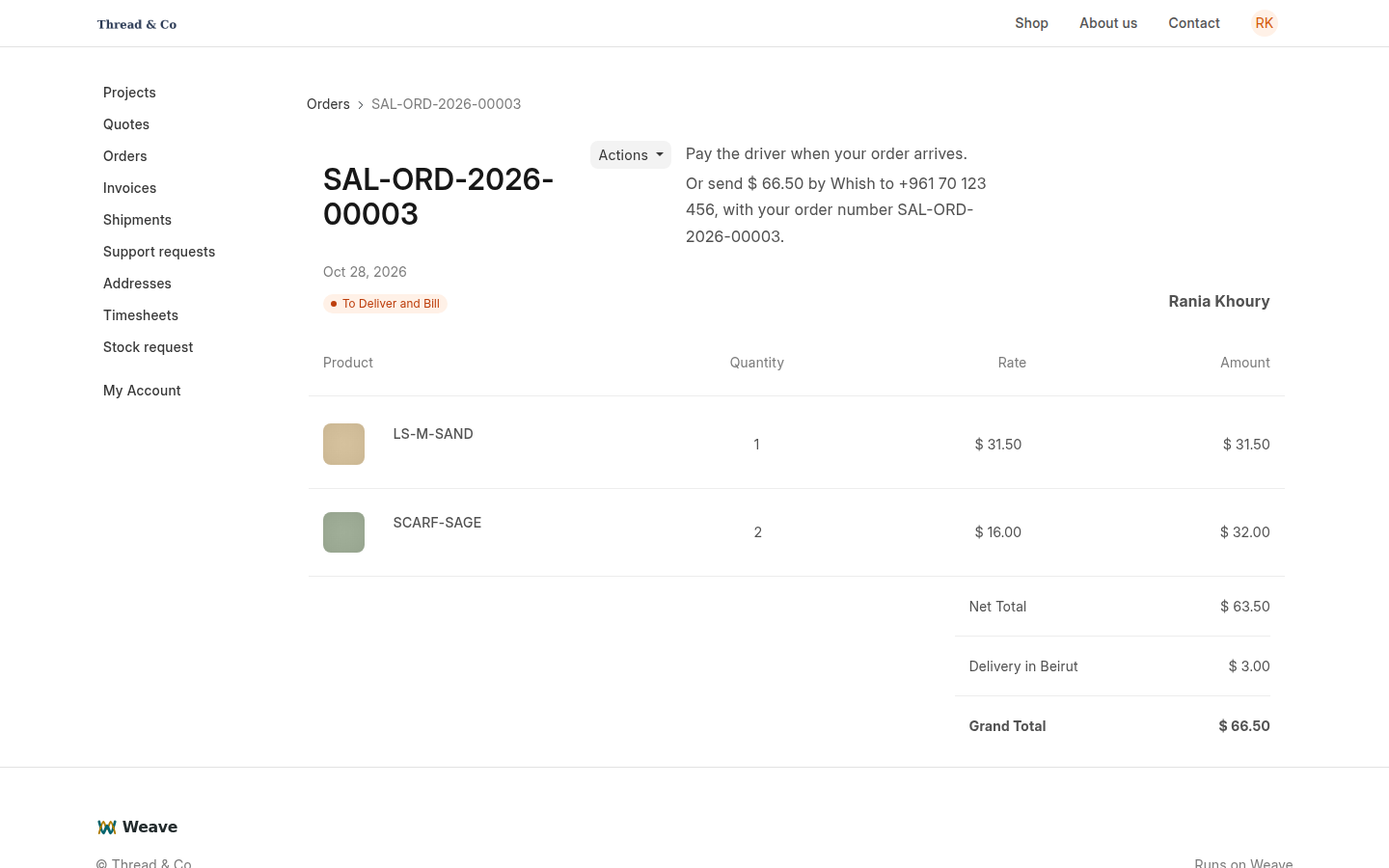
  6. Paying: their order page tells them how to pay: the driver on delivery, or by Whish to your number with the order number.
A customer's order page on the website
The order page as the customer sees it: products, delivery, total and how to pay.

The customer finds every order and its status in their account on the website, under Orders.