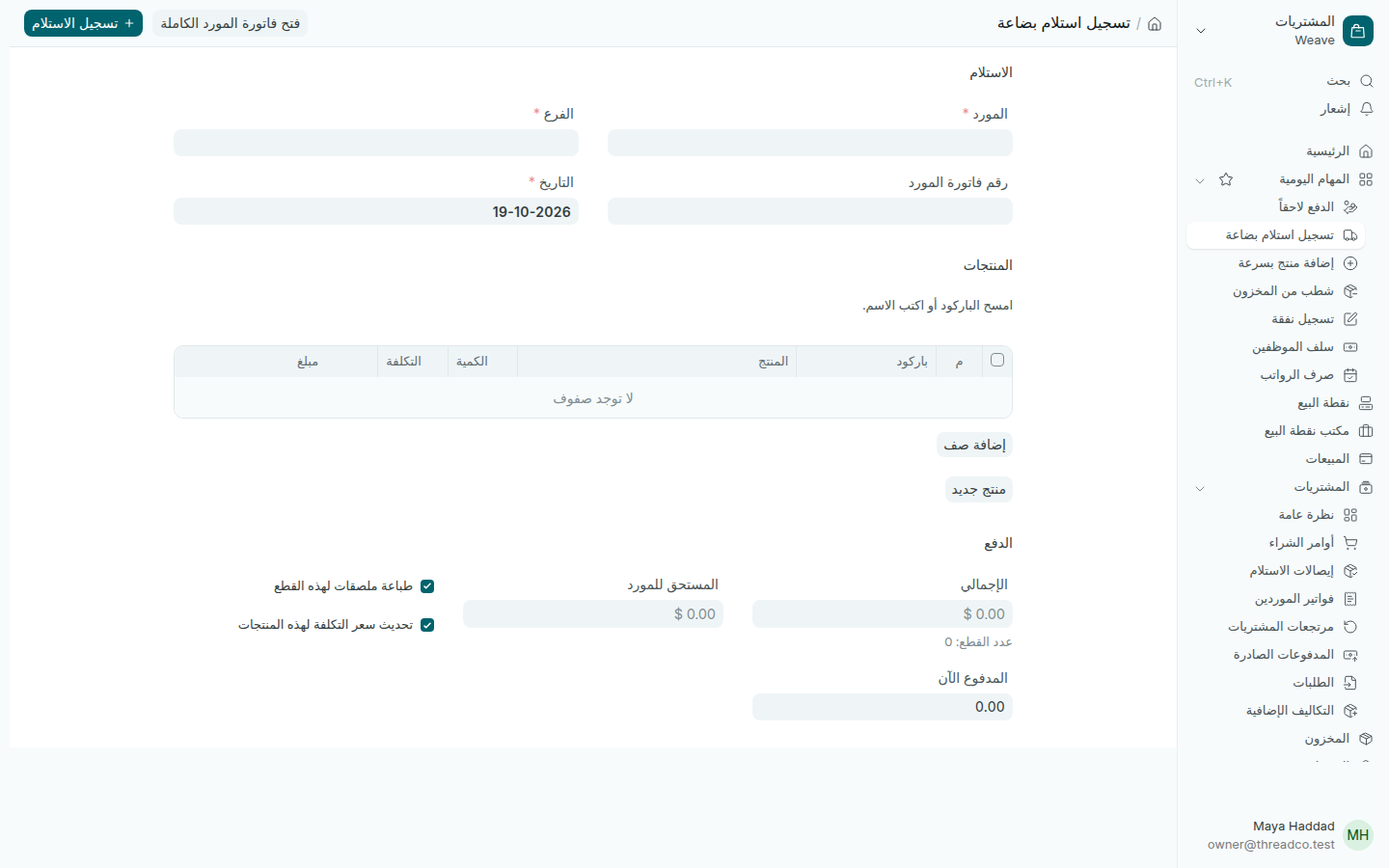
تسجيل استلام بضاعة

حفظ واحد يسجّل البضاعة في المخزون وفاتورة المورد والدفعة، ويحدّث أسعار التكلفة ويجهّز الملصقات.

الخطوات

  1. اضغط تسجيل استلام بضاعة في الصفحة الرئيسية أو في المهام اليومية.
  2. اختر المورد والفرع الذي وصلت إليه البضاعة. يظهر تحت المورد ما هو مستحق له كله. اكتب رقم فاتورة المورد إن وُجد، وتأكّد من التاريخ.
  3. في المنتجات امسح باركود كل منتج أو اكتب اسمه. يملأ Weave المنتج وسعر تكلفته الحالي. اكتب الكمية وعدّل التكلفة إذا تغيّرت.
  4. لمنتج لم يُسجَّل بعد، يستطيع المالك الضغط على منتج جديد وإضافته دون مغادرة الصفحة.
  5. في الدفع اكتب المدفوع الآن إن دفعت شيئاً، واختر من أين دُفع: الخزنة أو البنك أو حساب المالك. لا يُدفع من درج نقطة البيع. الباقي يظهر في المستحق للمورد.
  6. اضغط تسجيل الاستلام.
صفحة تسجيل استلام بضاعة
المورد والفرع، ثم المنتجات، ثم الدفع.

ما يحدث عند الحفظ

  • تدخل البضاعة إلى مخزون الفرع، وتُسجَّل فاتورة المورد بالدولار.
  • تُسجَّل الدفعة إن وُجدت، ويبقى الباقي مستحقاً للمورد.
  • تحديث سعر التكلفة لهذه المنتجات: محدّد في الأصل، فتصبح تكلفة الاستلام هي سعر الشراء الجديد.
  • طباعة ملصقات لهذه القطع: محدّد في الأصل، فتُضاف القطع إلى ملصقات للطباعة بعدد ما وصل.

الحفظ مرتين لا يسجّل الاستلام مرتين. لمورد يصدر فواتيره بعملة أخرى، أو لحالات خاصة، استخدم فتح فاتورة المورد الكاملة.
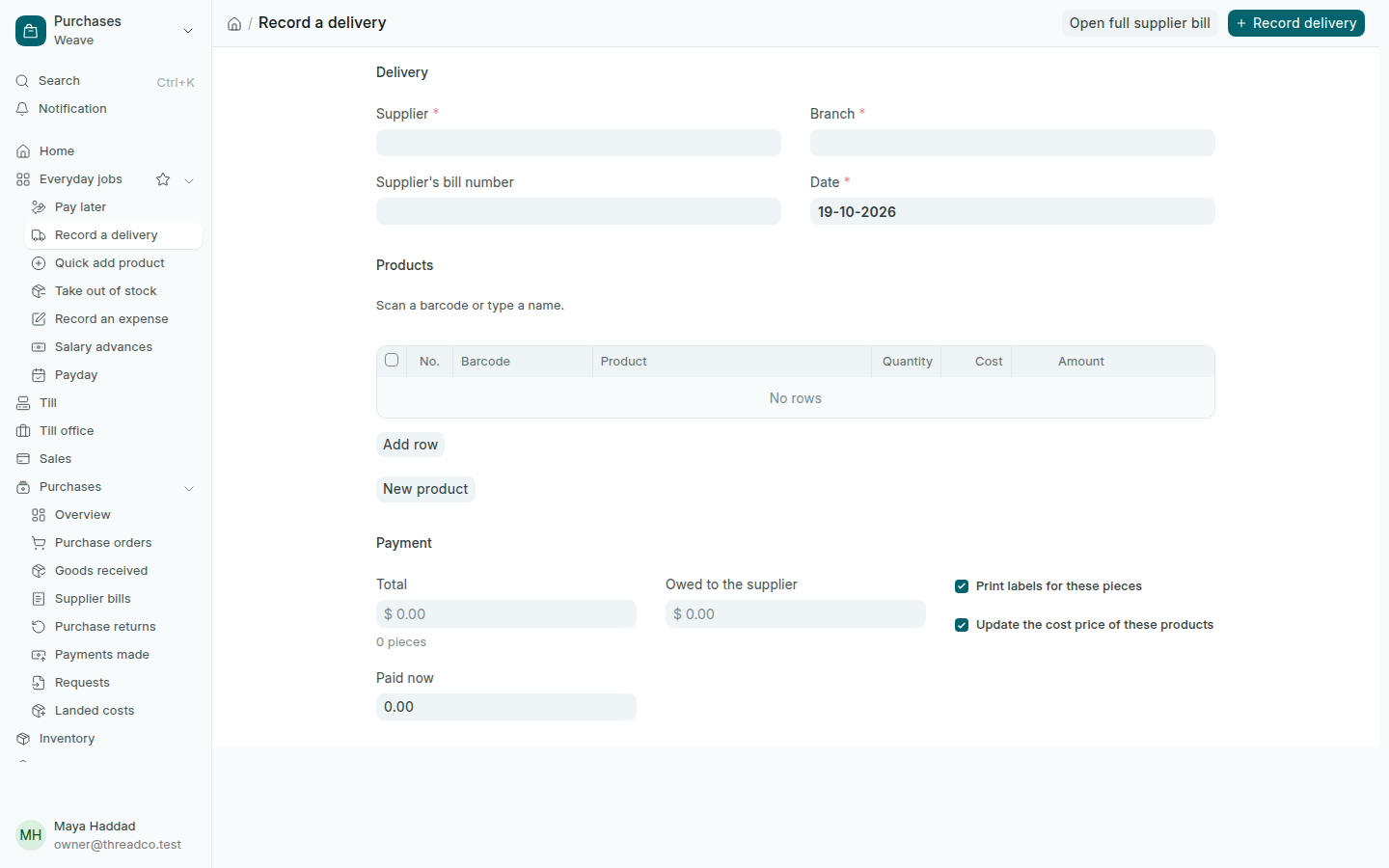
Record a delivery

One save records the goods into stock, the supplier's bill and the payment, updates cost prices and queues the labels.

Steps

  1. Press Record a delivery on the home page or in Everyday jobs.
  2. Choose the Supplier and the Branch the goods arrived at. Under the supplier, Weave shows what they are owed in all. Type the Supplier's bill number if there is one, and check the Date.
  3. Under Products, scan each product's barcode or type its name. Weave fills in the product and its current cost. Type the Quantity, and change the Cost if it has moved.
  4. For a product not yet in Weave, the owner can press New product and add it without leaving the page.
  5. Under Payment, type Paid now if you paid anything, and choose where it was paid from: the safe, the bank or the owner's account. A till drawer is never used. The rest shows as Owed to the supplier.
  6. Press Record delivery.
The Record a delivery page
The supplier and branch, then the products, then the payment.

What happens when you save

  • The goods go into the branch's stock, and the supplier's bill is recorded in dollars.
  • Any payment is recorded, and the rest stays owed to the supplier.
  • Update the cost price of these products: ticked by default, so the delivery's cost becomes the new buying price.
  • Print labels for these pieces: ticked by default, so the pieces join Labels to print, one label per piece received.

Saving twice never records the delivery twice. For a supplier who bills in another currency, or anything unusual, use Open full supplier bill.